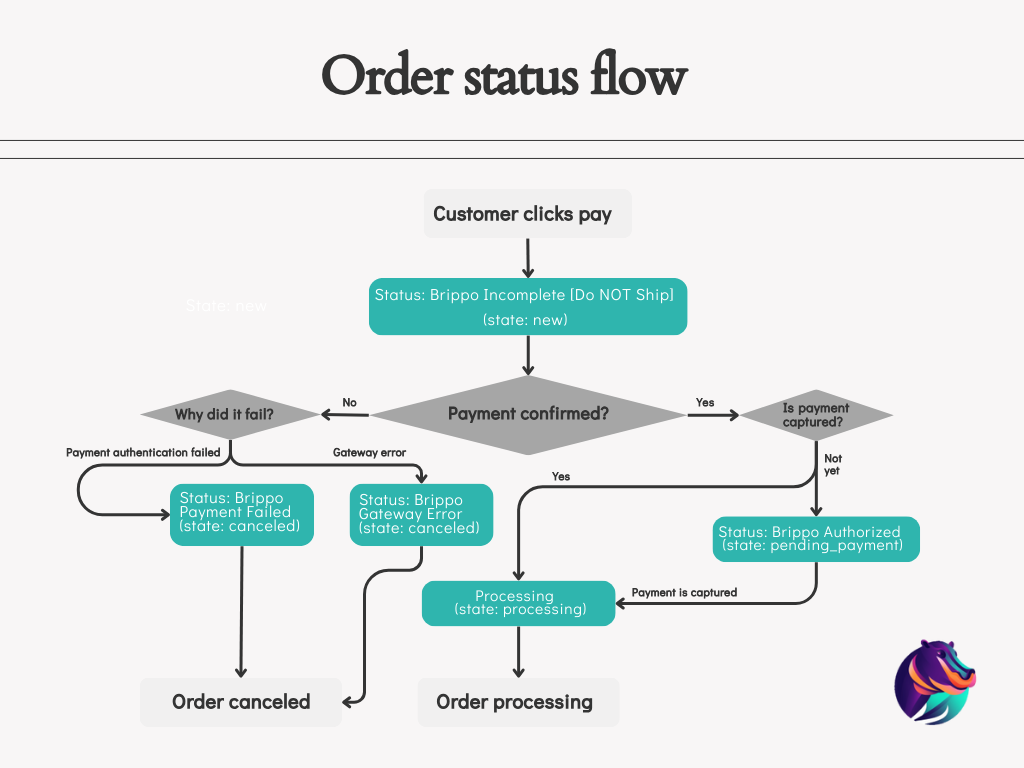

Adobe / Magento Order Status Flow
Brippo Payments uses custom order statuses to keep the payment workflow legible to the order-processing team. Below is each status and when it appears.
Custom statuses
1
Brippo Incomplete [Do NOT Ship]
state: newAfter the customer clicks Pay and before the payment is confirmed, the order is created with this status by default.
2
Brippo Payment Failed
state: canceledThe payment failed authentication — the order is canceled.
3
Brippo Gateway Error
state: canceledThe processing service failed at some point — the order is canceled.
4
Brippo Authorized
state: pending_paymentThe payment was authorized but remains uncaptured. This status only occurs when the Capture Method is not set to automatic.
5
Processing
state: processingThe payment was captured and the order was invoiced.
Order flow diagram
Visual map of how Brippo orders transition between statuses.