

Frequently Asked Questions
Quick answers to the questions we get most often. If yours isn't here, check Known issues or reach out via Get support.
?How do I check the installed extension version?
Installed extension versions are displayed in the Magento config section:

Pro tip: clicking the version text downloads brippo_payments.log.
?Where do I find Brippo logs?
Brippo Payments logs are under the var/log folder of your Magento instance. For WooCommerce, find them in WordPress Admin → WooCommerce → Status → Logs.
The relevant log files are:
- brippo_payments.log
- brippo_payments_monitor.log
- brippo_payments_service_api.log
Some logs only appear when you have Debug Mode enabled in your Brippo Payments configuration.
?Google/Apple Pay button shows but the modal won't open
If you see the Google/Apple Pay button but clicking it does nothing, it's usually one of two things:
- Another modal is already open in a different tabWhen one wallet modal is already open, a new one will silently fail to load. Close the previous modal (or the tab where it's open) and try again.
- A JavaScript error is breaking the flowWallet errors are usually reported in the browser console. Open the Inspect/Developer tools and check the Console tab for the actual error.
?Google Pay button isn't showing at all
If the Google Pay button never appears, run through these causes:
- Integration is in LIVE mode and no live CC saved in browserLive Google Pay requires a real card. Add one in Google Chrome → Settings → Autofill and passwords → Payment Methods.
- Integration is in TEST mode and no live/test CC savedIn TEST mode you need to be in the Developer group that allows test cards. See the Google Developers test-card suite.
- Not using Chrome or an Android deviceGoogle Pay only loads in Chrome or on Android. Other browsers won't show the button.
- No Google account signed inCards are stored on the Google account — without one signed in, no wallet appears.
- Order total is below the currency minimumStripe enforces minimum charge amounts (around GBP 0.30). See the Stripe minimum-amount docs.
- No SSL or invalid SSL certificateWallets refuse to load on insecure or misconfigured SSL.
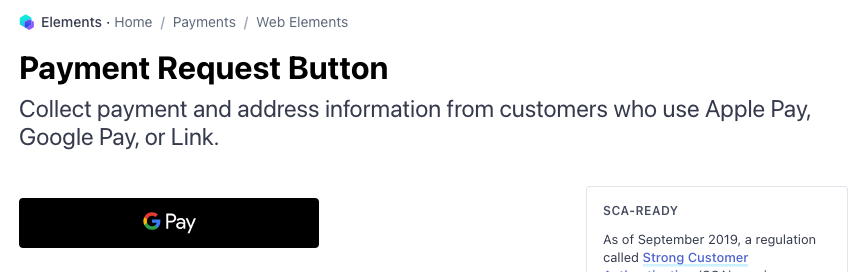
Stripe provides a check page to confirm a card is saved in your browser. You should see the wallet button below the title:
Still stuck? Check Known issues or Get support.
?Apple Pay button isn't showing at all
Same idea — run through these causes:
- Not using Safari or iPhone/iPadApple Pay only loads in Safari or on iPhone/iPad. A device with Touch/Face ID may also be required.
- Domain not registered in our Stripe accountBrippo verifies the domain automatically on install. Check Brippo Payments → General → Domain Registration Status to confirm.
- Order total is below the currency minimumAs with Google Pay, see the Stripe minimum-amount docs.
- No SSL or invalid SSL certificateWallets refuse to load on insecure or misconfigured SSL.
You can use the Stripe check page to confirm a card is saved.